
Lightroom CC Makes Editing Photos Fun Again

Lightroom Classic was the go to photo editing software for professional around the world. If you enjoyed photography or wanted to edited photos slightly the best software was from Adobe, but it was not easy to use nor was it tablet or mobile friendly.

Lightroom CC is different – it’s mobile friendly, made for tablets, and much easier to use on a laptop. Some power features are gone or at least I cannot find them but Adobe added in a bunch of new features. Now you can search for water and Adobe’s auto-tagging feature will surface all the photos with water in them. The biggest draws for me are:

  • Same interface anywhere – iPad, Mac, or iPhone
  • Smart tagging search allows me to easily find photos
  • The app feels lighter and faster than the classic version
  • The app is only $10 which includes Photoshop too

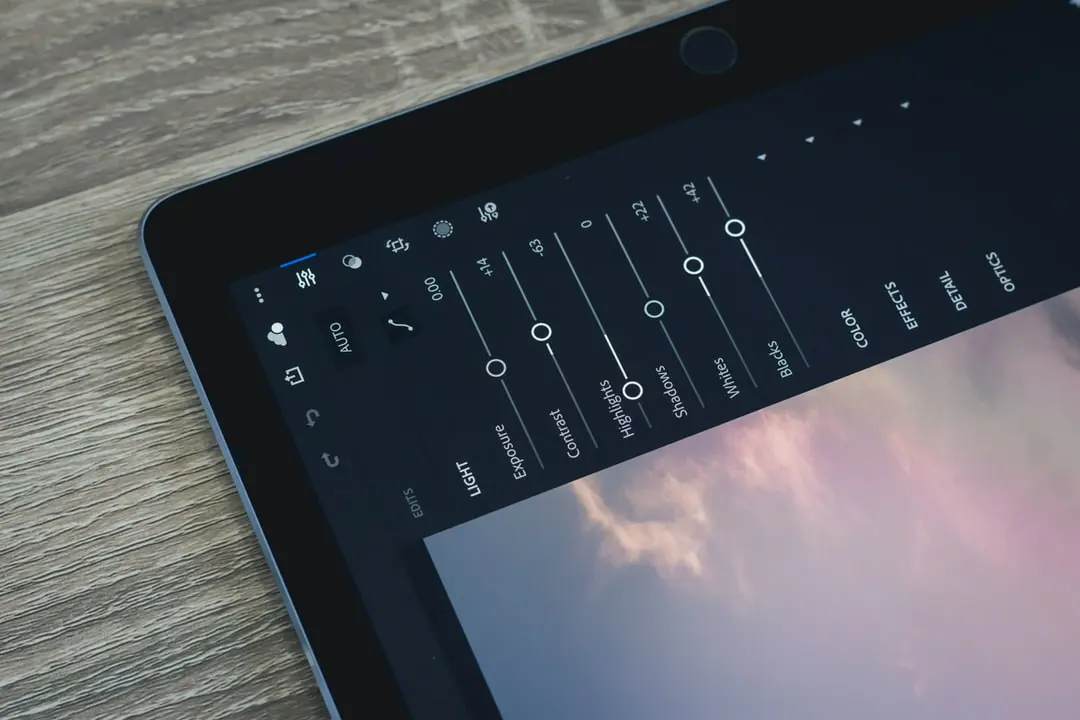
black iPad
Photo by Jye B / Unsplash

I don’t take photos on a DSLR everyday but I take then often enough that I turn to Lightroom Classic on a monthly basis. I have a 2 year old daughter and I have realized how much better photos look when they come from a camera not an iPhone. The Classic version had too many tools and too many hotkeys to truly master the software. Instead, I would often turn to other basic photo editors like Apple Photo’s, Polarr, or Google Photos.

Now I feel confident turning to Lightroom CC once again. The tools are clear, the app is fast and the same across the browser, mobile phone, tablet, and desktop version. I am once again paying the $10 a month for Lightroom CC and Photoshop. This is also why I am ditching the lighter Instagram style editors like Polarr.
Similar Posts

  • Why Whoop and Oura Are My Go-To Fitness Tools

    I’ve always been interested in tracking my health. For years, I used the Gyroscope app along with Fitbits and other fitness trackers. That all changed when my Apple Watch Series 2 unexpectedly died and I haven’t used anything since. Now I’m back into fitness and body tracking, partly because the health and longevity space is…

  • Mid-Year 2021 Update

    It’s almost the end of 2021! Another year of Covid-19 with precautions and vaccinations. The summer flew by, and I haven’t provided any updates. Primarily, I fell off of Twitter, Instagram, and blogging. I wasn’t giving updates because we bought a house just outside of San Antonio, Texas. It’s a new home construction with many…

  • Tutorial to Set Up Google Tag Manager Event Tracking

    Tracking contact form submissions, phone call clicks, and more actions that take users off-site is possible with Tag Manager. Google Tag Manager can help you not only keep track of scripts but also help you do more advanced tracking. Tag Manager has the ability to track when someone leaves your website, clicks a phone number…

  • 2025 Annual Review

    I do a version of these annual reviews each year: 2025 was a year of hard pivots. I killed some businesses. I rebuilt others. If there’s a theme to this year, it’s knowing when to walk away and when to double down. Business Let’s start on the professional side. It’s what most want to read…

  • Tools & Software Needed to Run a Remote Marketing Agency

    Are you building an agency or starting your agency out? I’ve put together a list of tools, software, and thoughts on effectively running a remote marketing agency. But what are my qualifications? I’ve worked in agencies and helped build them from zero in revenue to tens of thousands of recurring revenue each month—the most powerful…